
Verify Gift and reward claims against TikTok’s own records, not overlays, private messages, or payment screenshots. Do not send a sender a private “refund,” pay a release fee, or disclose login codes because someone claims a Gift or payout needs urgent correction.
TikTok Newsroom — Security Checkup controls.
Treat the room as a place where claims need verification
A busy LIVE combines public comments, animations, external overlays, and private messages. An attacker can exploit that pace by presenting a convincing event and demanding an immediate off-platform response.
The first defense is to identify which system produced the evidence. A message written by a viewer, a sound from an overlay, a screenshot, and TikTok's account activity are not equally authoritative.
Do not accuse a person solely because an event is confusing. Pause the financial action, preserve the relevant evidence, and verify through your own records. This protects legitimate viewers as well as the creator.
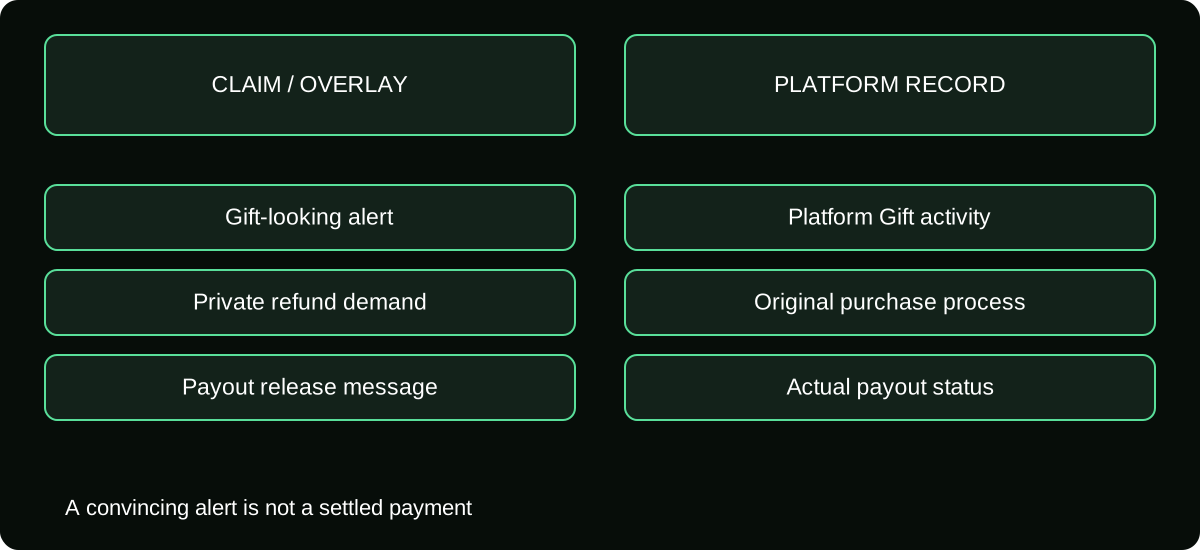
A Gift-looking alert is not a settlement record
External tools can display content or react to events, and viewers can post text resembling an announcement. A visual celebration does not itself prove a processed Gift, a Diamond award, or money ready for payout.
Check the platform's own session and reward information. If a technical integration is involved, understand its source, permissions, and limitations. Do not authorize account access just to validate a single alert.
When the alert and account record disagree, keep the discrepancy as a technical or evidence question. Do not promise a cash refund or announce a verified income total while the underlying event remains unconfirmed.
Handle private “refund me” demands through the platform
Someone may claim they sent too much or that a family member used the account. The claim could be genuine, mistaken, or deceptive. It does not establish that you should send money to a private bank, wallet, or crypto address.
Direct the sender to the purchase and support process for their actual order. Your reward record is not their retail receipt, and a private repayment can create a second transaction unrelated to the platform's eventual decision.
Preserve the interaction without publishing personal details. If TikTok or a payment provider contacts you through an authenticated case, respond through the legitimate route. Do not treat an unsolicited account claiming to represent the case as proof of authority.
Watch for payout and agency impersonation
Messages may claim that your reward is blocked until you pay a tax, processing charge, verification deposit, or agency fee. Verify the issue inside your signed-in account and with the actual provider before taking action.
A brand logo, copied staff photo, or private invitation does not establish a role in your payout. Use independent navigation and contact information rather than the links supplied by the person making the demand.
For a real agency or service agreement, read its scope and payment terms separately. Do not assume someone controls TikTok eligibility or settlement because they say they manage creators. Access and promises should match a verifiable, authorized relationship.
Remove recharge traps aimed at your viewers
Scammers can use your room to advertise cheap Coins, generators, gift-card exchanges, or login-based recharge. Viewers may trust the message because it appears beside legitimate creator activity.
Give moderators a clear rule to remove impersonation and unsupported financial offers using the platform's tools. A pinned reminder can identify official purchase routes without directing people to a private seller.
Never let a moderator collect viewers' passwords, one-time codes, or full gift-card PINs as part of “helping.” A viewer with a purchase problem should keep the order evidence private and use the merchant or payment-provider route relevant to them.
Prevent account access from becoming the next loss
TikTok's official Security Checkup covers linked recovery methods, two-step verification, devices, alerts, and passkeys where supported. Review those settings independently, especially if a suspicious message requested access.
A QR code or device confirmation can relate to login rather than purchase. Read the action you are approving. Do not accept an unexpected prompt because someone says it will validate a Gift or unlock your balance.
Secure the email and other accounts used for recovery as well. Protecting the TikTok password alone may not resolve exposure if the attacker can control a linked recovery route or an authorized device.
Use a simple incident routine during the LIVE
| Action | Purpose |
|---|---|
| Stop the requested payment or authorization | Avoid a second loss while facts are unclear |
| Preserve the message and event time | Keep evidence for the real account case |
| Check platform records | Separate a claim from a verified action |
| Use moderation tools | Reduce further exposure in the room |
| Contact official support privately | Investigate without publishing sensitive details |
If the incident makes safe moderation difficult, pausing or ending the stream can be appropriate. Protecting access and viewers matters more than keeping an uninterrupted broadcast while private credentials are being requested.
Investigate without promising recovery
For an account compromise, use the legitimate recovery process and review devices, recovery information, and payout settings. For a payment you made to a scammer, contact the actual payment provider promptly and ask about available remedies.
The U.S. FTC's scam guidance recommends contacting the company used to send money and explains that recovery is not guaranteed. Readers elsewhere should use their provider and local reporting channels rather than assuming U.S. procedures apply universally.
Afterward, review what made the claim persuasive: an overlay, a copied username, urgency, or an unclear moderator process. Improve that specific control. The durable lesson is to verify financial actions in the systems that actually record them, not to infer entitlement from a convincing performance in chat.
Review what your alert tools are allowed to do
Keep an inventory of overlays, bots, and connections used in the room. Note which only display messages and which have account permissions. If a connection is no longer needed, review it through the legitimate settings rather than leaving an unknown integration active.
When an alert becomes suspicious, identify whether it came from TikTok, a connected service, or a manually triggered media source. Do not let its visual style determine the answer. This source check helps distinguish an actual financial event from something presented on top of the stream and gives support a more reproducible incident report.
Frequently asked questions
What if a claimed sender threatens to report me unless I repay privately?
Preserve the threat, avoid exposing more information, and use legitimate reporting and support. A threat does not establish the underlying payment or the person’s authority to demand a separate transfer.
Should I ban every viewer who asks about refunds?
No. A payment question can be genuine. Keep the response factual, protect private information, and distinguish a request for help from an attempt to obtain credentials or private money.
What if a moderator posted the suspicious link?
Remove the exposure, review their permissions and the incident evidence, and secure the account if necessary. Moderator status does not make an unsafe payment request legitimate.
Sources and scope
- TikTok Newsroom — Security Checkup controls
- TikTok — LIVE Monetization Guidelines
- U.S. FTC — what to do if you were scammed
- U.S. FTC — refund and recovery scams